Math
I’m not bad at math, but never considered it a strength. This is interesting, since I would consider both coding and econ strengths, and they’re math-adjacent.
Anyway, it’s always been on my list of things to get better at. Recently I’ve come up with a pretty good workflow for it and thought I’d write it up.
System
The system has four parts: one is attitude/mindset, the three others are tools.
The mindset, basically: math isn’t something to rush through.
There’s a continuum in understanding a math topic, from “barely enough to do a problem” to having more intuition and being able to look the same concept multiple ways, understand what it assumes, what would make it different, etc. Math is better (and more fun) when you’re further out on the “depth” part of the continuum.
I’m sure there are people who are naturally inclined towards depth (we have a kids book on Paul Erdos and it’s clear he thought about math all the time) but even if you’re not, it’s not hard to get there with discipline and the right habits.
More on mindset below. Apart from that, there are the tools:
A curriculum/roadmap/knowledge graph. I use Math Academy for this.
An intuition engine/teacher/explainer, for understanding (in depth) whatever topic I’m on. Something I can go back and forth with, ask questions, etc. I use Claude.
Something to remember what I’ve learned, Anki.
Mindset
I liked this essay by Nabeel Qureshi How to Understand Things.
In it he talks about his smartest friend, who — after solving a math problem — would “go back and continue thinking about the problem and try to figure out different proofs of the same thing.”
Teenage Nabeel marveled at this. “Sometimes he’d spend hours on a problem he’d already solved.” As opposed to Nabeel, who would stop thinking about a problem immediately once he got the answer.
His conclusion: “intelligent people simply aren’t willing to accept answers they don’t understand”.
The physicist William Shockley called this the “will to think” and Nabeel argues in this essay it’s independent of how ‘quick’ (e.g. with processing speed, working memory) a person is.
Since reading this, I’ve tried to view math/math problems as less of an obstacle to be climbed over quickly, and more as a check on understanding that comes after I understand/have good intuition for a topic.
Curriculum
To learn an established subject like math, you need:
- a good curriculum
- the ability to keep track of where you are in it
- a way to figure out where you should start
Math Academy is great at all this. I’ve been using it about a year. Apparently it’s what Alpha School uses as the engine to teach all of their students, and I can see why.
They’ve basically broken down all of math, from 4th grade to university courses like linear algebra and differential equations, into appropriately sized “chunks” (topics). E.g. logging in right now I see:
- Coterminal Angles
- Limits of Logarithmic Functions
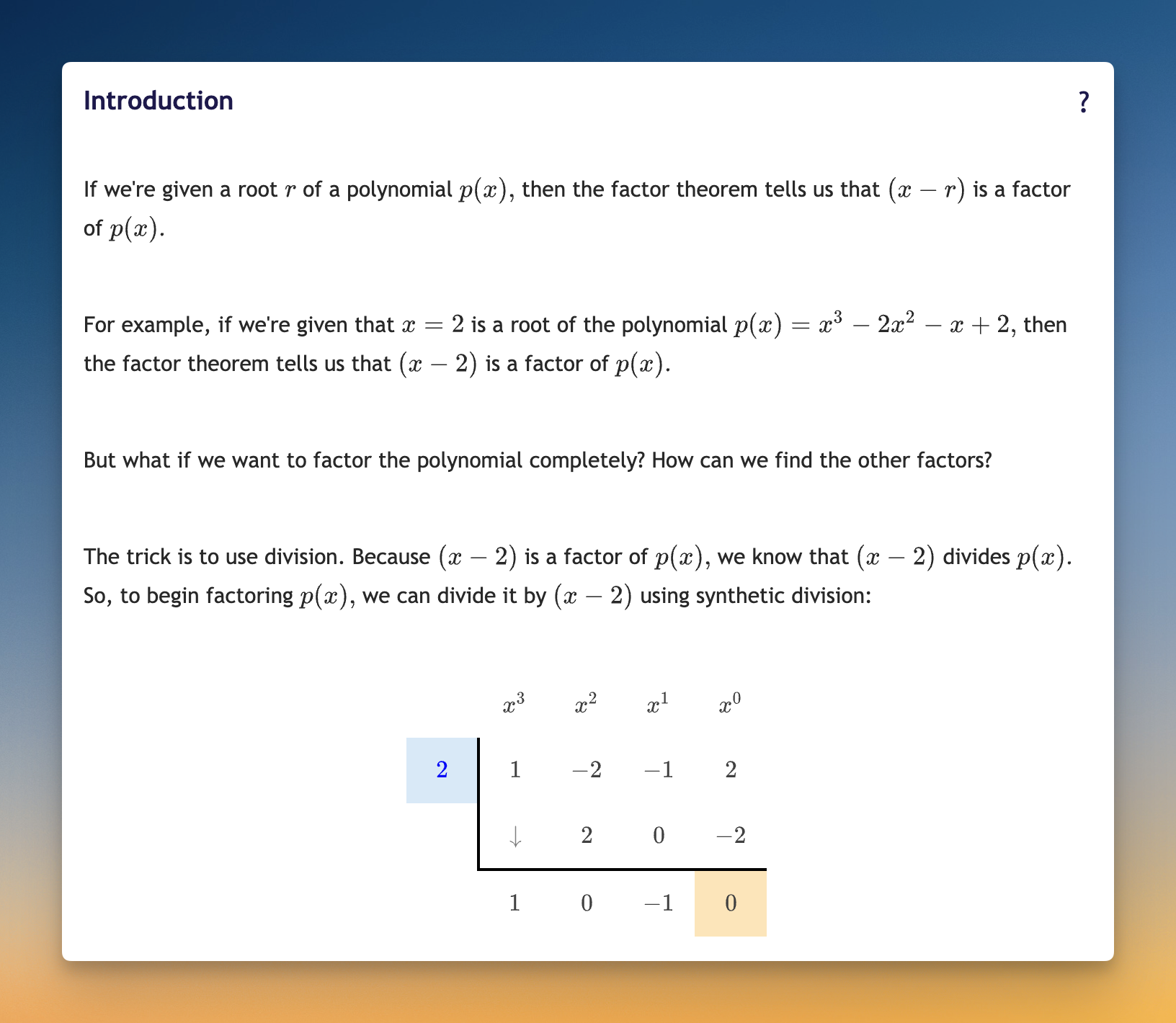
- Factoring Cubic Polynomials
- Periodic Functions
Each topic includes a brief explanation, some worked examples, and a bunch of problems. Here’s an example for ‘Factoring Cubic Polynomials’:
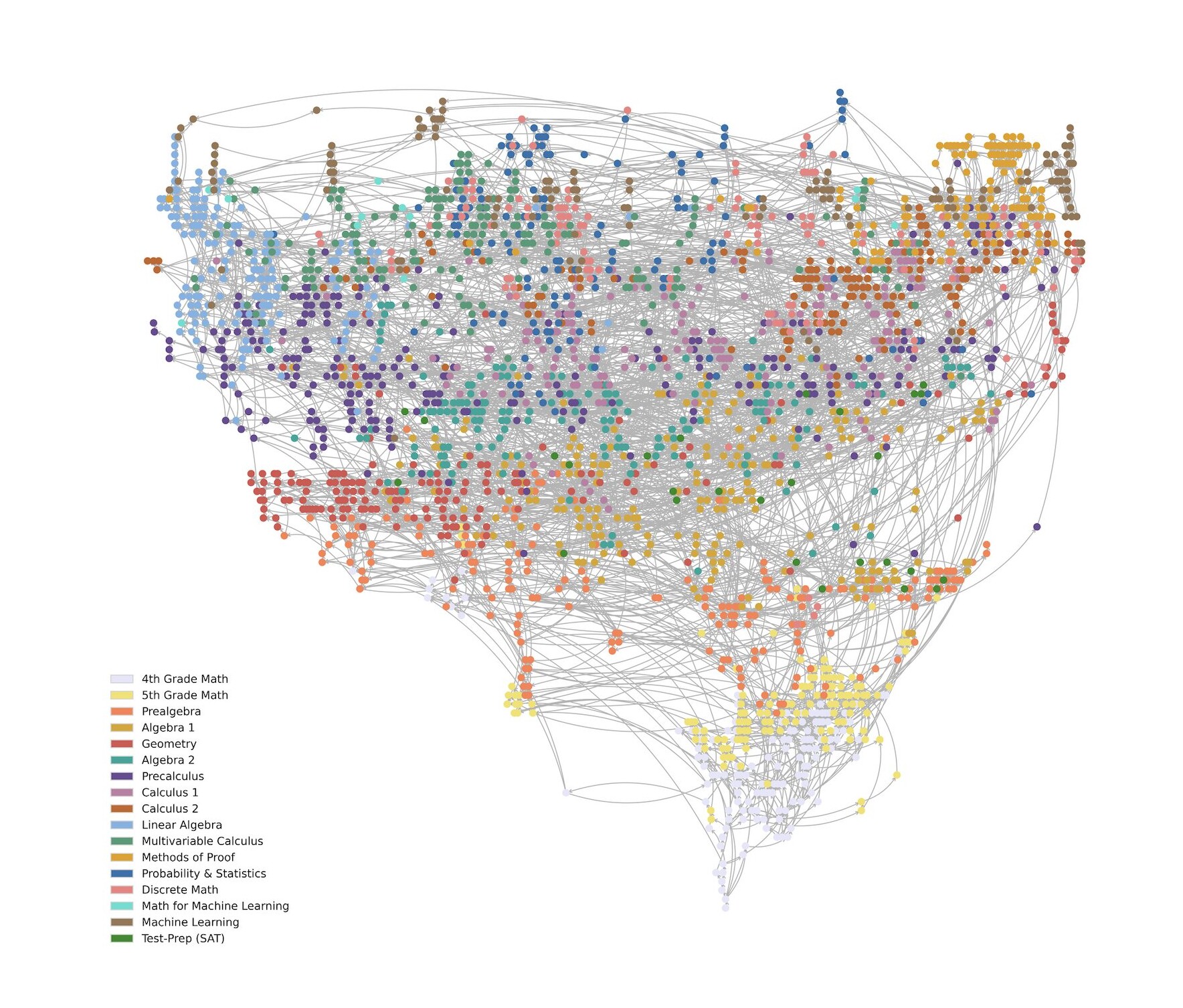
Topics are linked together. Once you prove “mastery” (by getting the problems right) its dependent topics become unlocked.
This set of linked topics is called the “knowledge graph”. Doing Math Academy is basically working through the knowledge graph.
Intuition engine/explainer
Math Academy is good as a collection of topics and associated problem sets. It’s not always great when it comes to actual teaching. Usually a lesson is just a barebones explanation and some worked examples. Sometimes that’s fine, but I’ve found getting intuition is more work.
Luckily, Claude is great at intuitive explanations, and it can take questions and engage in a back and forth.
So that’s what I do. Math Academy handles the lesson and review topic ordering, but I completely ignore the instruction part of their lessons. Instead I built this workflow (link below):
1. A split screen in Claude Desktop
In Claude I type:
/math
It brings up a split screen — half chat, half browser logged into Math Academy. Then I click on the lesson I’m on and tell Claude.
2. Claude (automatically) looks at the lesson, and explains it.
In particular, I have it focus on intuition and explaining how it fits in with everything else. For example, here’s Claude on ‘Factoring Cubic Polynomials’:
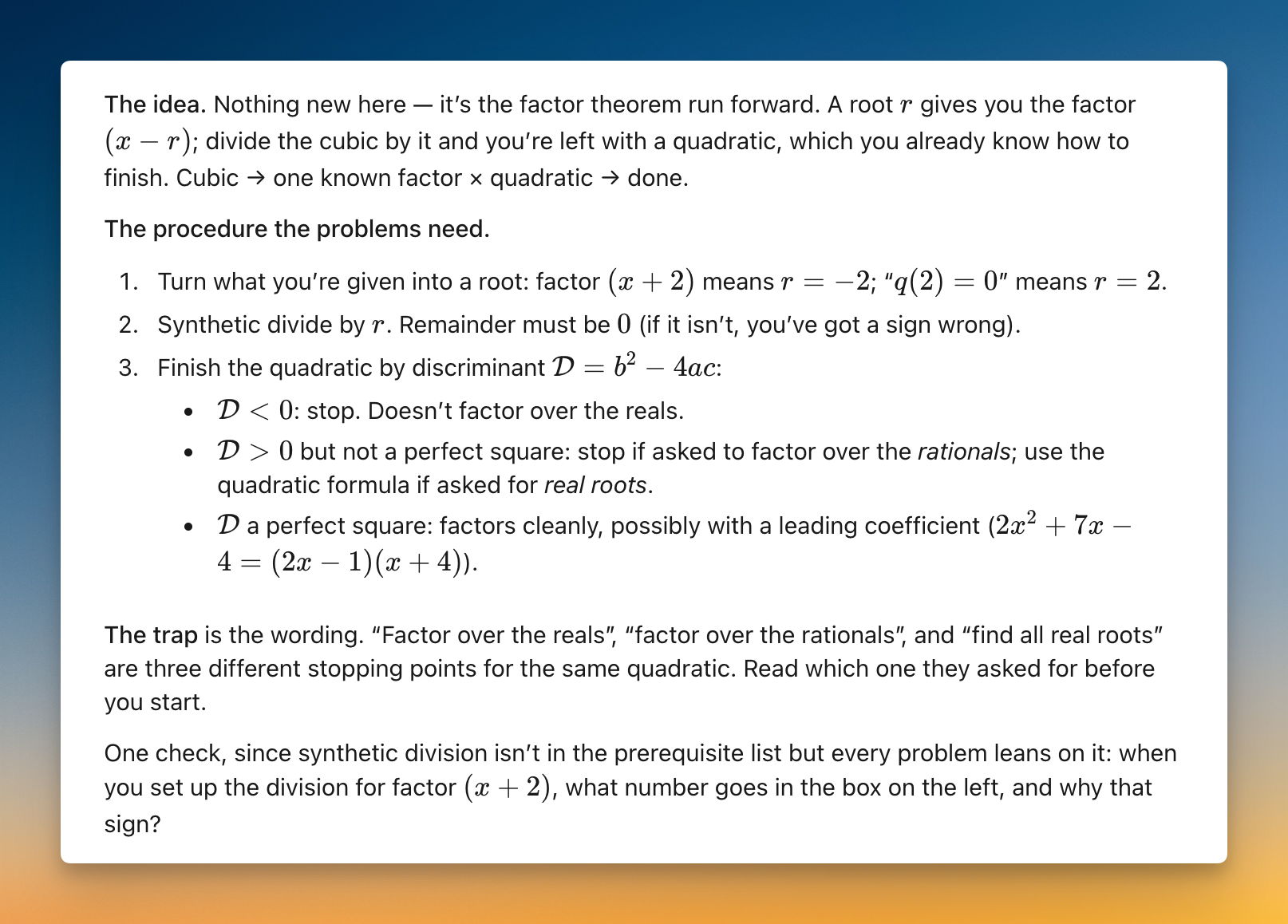
In this case there was a gap — I wasn’t sure what ‘synthetic division’ was — so I asked Claude about it.
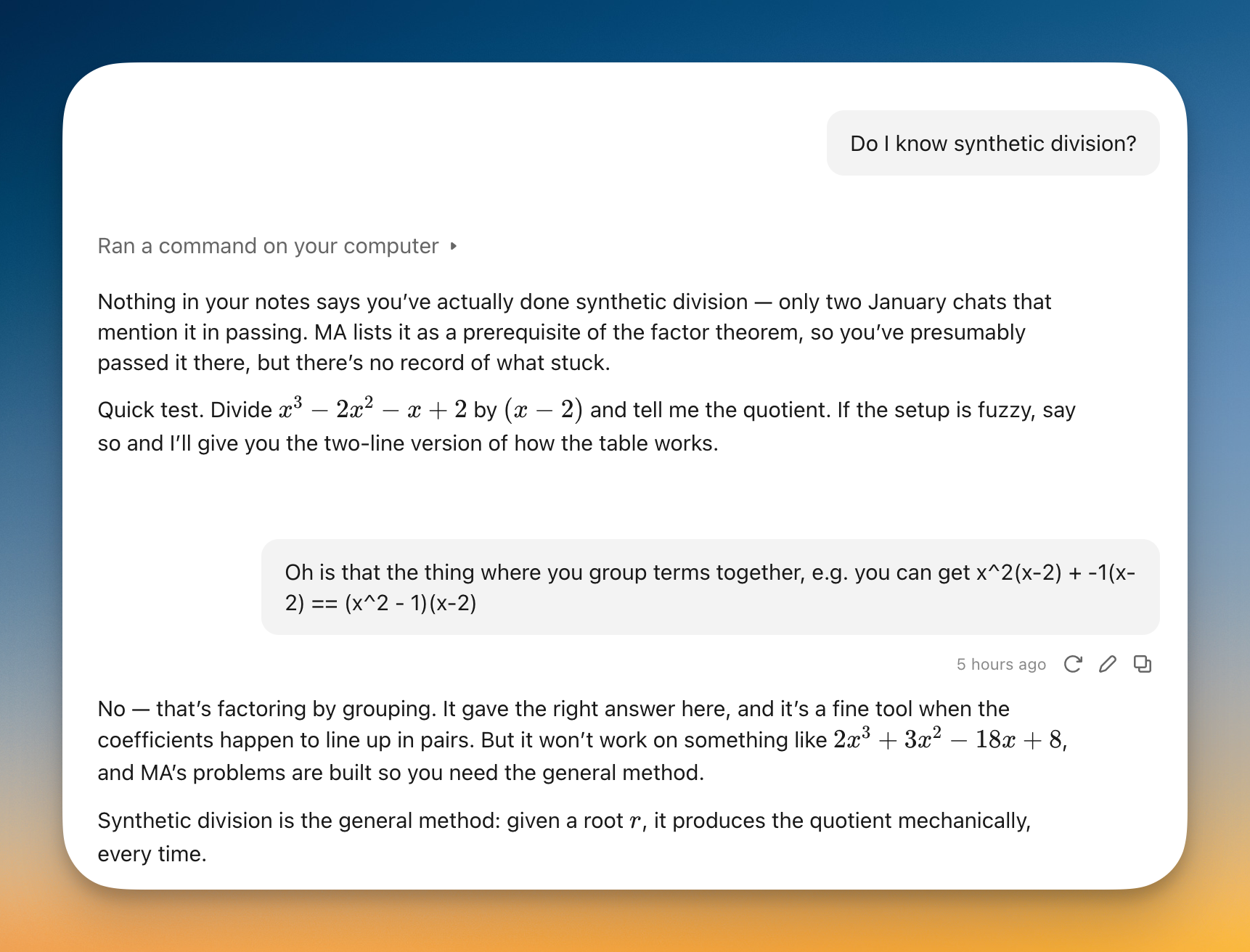
Claude ended up explaining it to me and gave me a couple practice questions to make sure I got it.
3. Once I have the intuition, I do the Math Academy problems.
Usually post Claude explaining it they’re straightforward, but not always. If I do have questions Claude can help generally (with e.g. topics or prerequisite topics), but it’s not allowed to help with specific problems I have open. Interestingly Claude came up with this rule when I worked with it on designing the workflow.
Remembering what I’ve learned with Anki
There’s one more piece, which is that a lot of math builds on itself. So it’s not enough to come up with good intuition once, I need to remember and be able to access it too.
Math Academy has built-in spaced repetition via topic reviews, but it’s all problems. You can’t review concepts or revisit intuition directly.
Luckily, remembering things is a solved problem, and that solution is Anki.
I have a big deck of Anki cards with math concepts. This is nice (vs Math Academy’s reviews) because I can zoom in on the same concept different ways, see graphs, do clozes etc. Plus I can skip topics that aren’t important or just derivations of something else.
I lean heavily on Andy Matuschak’s Anki prompt writing guide to come up with good cards.
As I’m working, I’ll make note of things I think it’d be helpful to put in Anki. For example, while doing the Factoring Cubic Polynomials problems I told Claude we should add:
- synthetic division (what it lets you do generally, don’t need whole algorithm)
- discriminant (what it is, what means for roots etc) and quadratic formula
- also something broader (Andy M “why”) re: roots and why they’re important/math curriculum spends so much time on them
From there Claude drafts the cards, and I’ll review and tweak them (using a little web dashboard I built) before adding to Anki.
How it’s going
I’ve been doing Math Academy ~a year, and the Claude + Anki layer about 6 months, so it’s a bit early to evaluate (I’m not on Math Academy’s university level courses yet), but it’s promising so far. I’ll report back in a couple months.
I will say the very first math topic I Anki’d (logarithms and exponentials and their derivatives) I still have down cold, so that part seems to be working.
It’s been pretty fun. I think having to study math in school for so long makes people take for granted how interesting it is. It’s really a unique blend of abstractions (what are numbers really) and perfect logical consistency. Anyone can get started with it (apparently even fish can count to 4) but the smartest people in the world can work on it their whole lives and still have more to learn.
Scott Adams says in How to Fail at Everything that one of the keys to happiness is being optimistic about the future, and one way to do that is to work at something you can gradually get better at. He suggests golf or tennis, but after doing it a bit I think it works for math too.
Claude Skill
I wrote the whole Claude-Math Academy-Anki card workflow in a Claude skill
(/math), which is available here:
https://nathanbraun.com/math-skill.md
To use it you need:
- Claude Desktop with browser tools
- Math Academy account
It’d also be good to have an Anki deck set up (I use the computer version to add cards and usually review them on my phone), though that’s not strictly required. The skill also writes per-topic notes to keep track of where everything fits.